Get in touch
LinkedIn Twitter Instagram
Back to portfolio

UX Case Study · Fintech · Web App · New Product

Booster — Multi-Lending Platform

Designing a brand-new web platform from zero — giving Nigerians access to loans from multiple accredited providers in one place, with transparent terms and a frictionless application flow.

My Role
Lead Product Designer
Platform
Web App
Type
New Product (0→1)
Industry
Fintech / Lending
Booster — full design spread

What is Booster?

Booster is a multi-lending web platform that aggregates loan products from multiple accredited providers — letting users compare, apply, and manage loans in a single dashboard. It was designed from scratch as a 0→1 product with no existing design system or prior version to reference.

The core challenge: lending in Nigeria is fragmented, opaque, and deeply mistrusted. Users rarely know which provider to trust, what terms they're agreeing to, or what happens if something goes wrong. Booster was built to fix all of that — with transparency, clear system feedback, and a loan management experience that keeps users in control at every step.

0→1
New product from scratch
0
Loan providers integrated
0
Core user flows designed

Designing trust into a product that didn't exist

Building a lending platform from zero meant solving both product and UX problems simultaneously. There was no legacy to work from — but also no guardrails. Every design decision had to be justified from first principles, especially given how sensitive loan management is for users.

🏦
Trust deficit in Nigerian lending
Users are deeply sceptical of online loan platforms. Booster needed to communicate accreditation, transparency, and safety without overwhelming the interface.
🔀
Multi-provider complexity
Surfacing 12+ loan providers with different terms, amounts, and durations — while making comparison feel simple and choosing feel confident.
🪪
BVN verification friction
BVN is required for loan eligibility but is a high-anxiety step for users. Designing a flow that felt safe and explained the why was critical.
⚠️
Error states and edge cases
Overdues, invalid OTPs, failed requests — all high-stress moments. Every error needed a human voice and a clear recovery path to prevent abandonment.

Three principles that guided every decision

Principle 01
Radical transparency
Show users exactly what they're getting — loan amount, total payback, interest rate, due date — before they commit to anything.
Principle 02
Guided journeys
Every flow has a clear start, middle, and end. Modal-based flows keep context visible and reduce cognitive load for sensitive tasks.
Principle 03
Human error handling
Every failure state has plain-language copy, a clear reason, and a specific next step. Nobody gets stranded with a generic error code.

Onboarding that earns trust from the first screen

The sign-up page opens with an immediate value statement: "Access loans from accredited providers." No fluff, no marketing speak. Users register with name, email, phone, and password — or continue with Google. The login page mirrors this clean approach with "Welcome Back" framing.

Sign up page
Sign Up
Login page
Login

A single view of everything that matters

The dashboard was designed as a true command centre. The left sidebar keeps navigation persistent and unambiguous. The main panel surfaces the user's total repayable amount immediately — with one-click access to "See details" and "Pay back." Recent transactions, loan application history, and the referral programme round out the experience. A contextual "Buy Now Pay Later" banner surfaces an additional product within the same platform.

app.booster.com/dashboard
Booster dashboard
01
Total amount payable — front and centre
The most important number for a loan user is what they owe. This was deliberately placed as the hero element of the dashboard, not buried in a loans tab.
02
Verify BVN persistent CTA
BVN verification unlocks loan offers. Rather than blocking the dashboard, it lives as a persistent green button in the header — visible but never disruptive.
03
Referral programme with gamification
Points, tiers (Gold), and a shareable referral link were designed into the dashboard to drive organic growth — without competing with the core loan management UX.

Turning a high-anxiety step into a trusted one

BVN verification was the most sensitive flow to design. Users are asked to share government identity details — a request that immediately triggers suspicion in Nigeria's digital context. The modal opens with a "Why we need your BVN?" link above the fold, an optional defer ("I'll do this later"), and a clear explanation that this unlocks loan offers. The OTP step is transparent about where the code was sent, with a countdown timer and prominent resend option.

BVN modal — enter BVN + DOB
01 · Enter BVN
Check email for OTP — empty
02 · Check Email (empty)
OTP entered
03 · OTP Entered
BVN verified
04 · Verified ✓

Failure states were designed with equal care. An invalid OTP shows a red inline error with "resend or go back" — not a blocking alert. A failed verification request surfaces a warm amber warning icon with "Try again" and "Close" — keeping the user in control.

Invalid OTP error
Error — Invalid OTP
Request failed error
Error — Request Failed

Applying for a loan in four clear steps

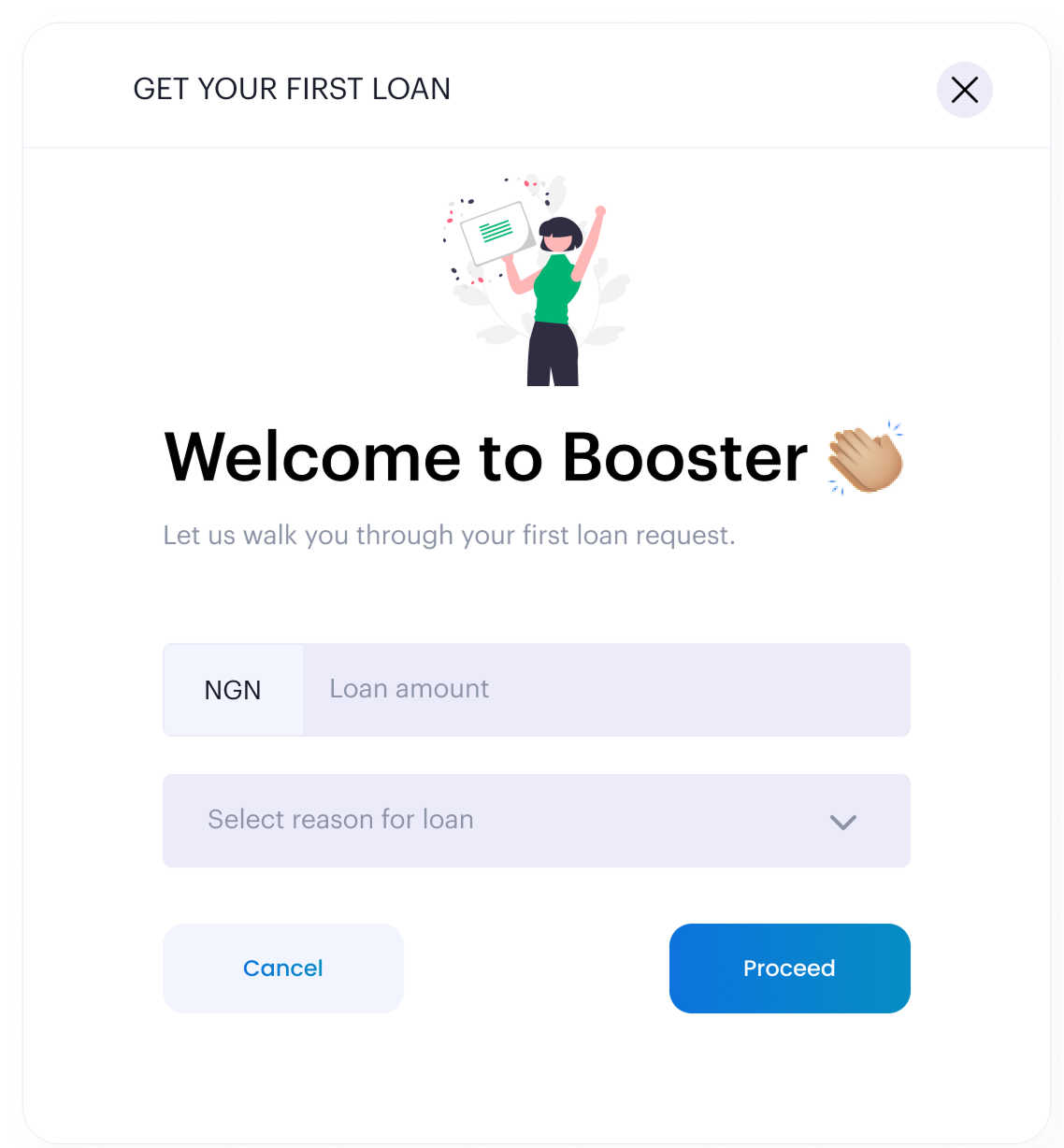
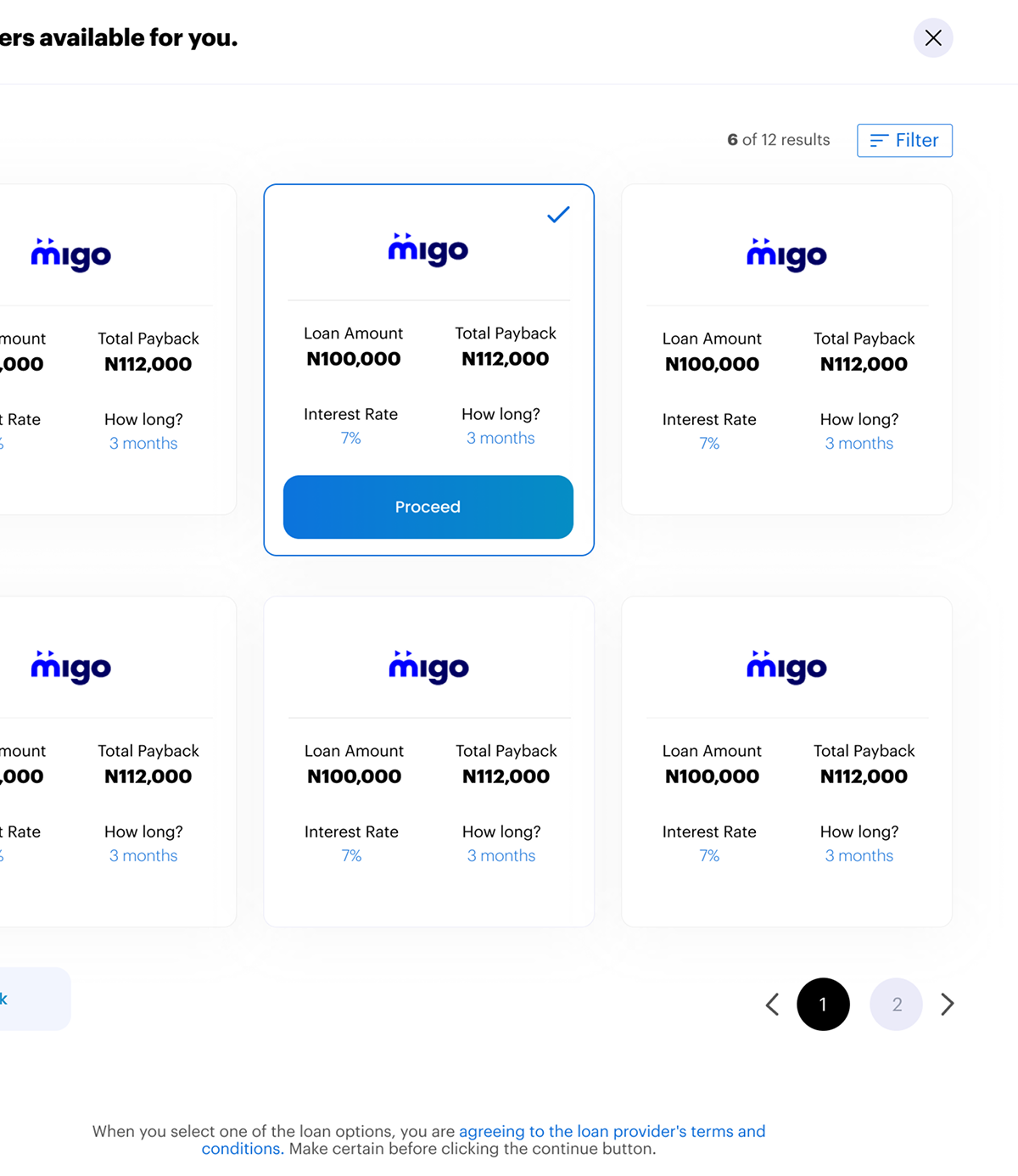
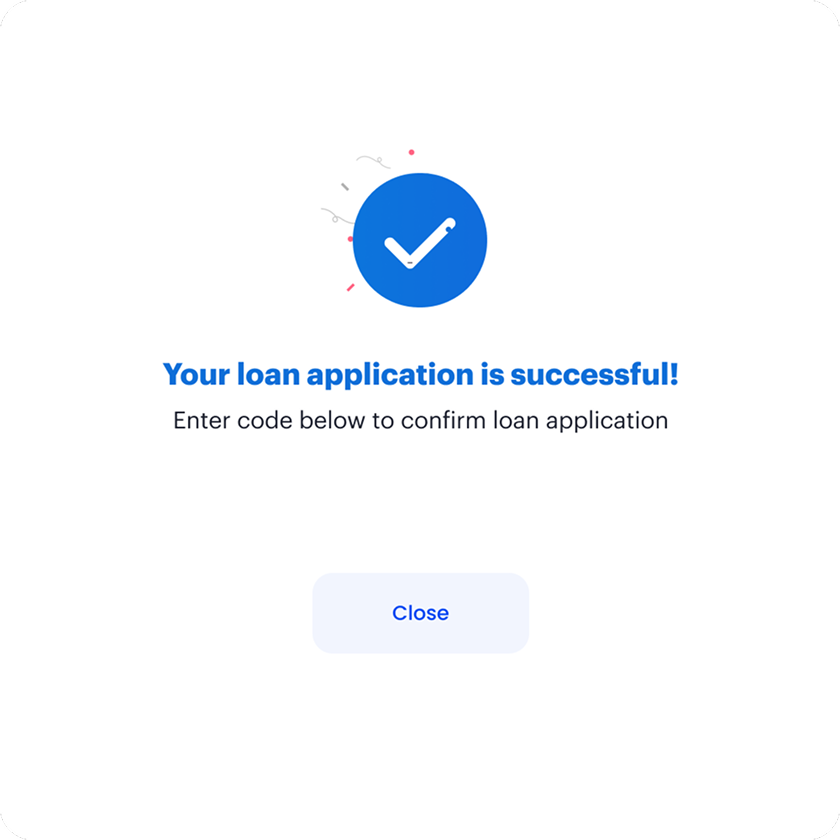
The loan application opens with a warm "Welcome to Booster" screen that frames the first loan as a guided journey — not a form to fill. Users enter an amount and select a reason for the loan before seeing offers. The offers grid surfaces providers with full transparency: loan amount, total payback, interest rate, and duration — all visible before selection. A filter panel with range sliders lets users narrow by amount, duration, and interest without leaving the modal.

Welcome to Booster — first loan
01 · Welcome
Loan offers + filter panel
02 · Offers + Filter
Offer selected
03 · Offer Selected
Loan application successful
04 · Success
Provider-first cards show the lender logo prominently, building familiarity with accredited names before users commit.
Filter panel with range sliders keeps the comparison in-context — no separate pages or complex navigation needed.
Selected state uses blue border + checkmark — instantly clear which offer is chosen before proceeding.
Success screen with confetti closes the anxiety loop — celebrating the approval and reducing post-submission uncertainty.

Keeping users informed — especially when things go wrong

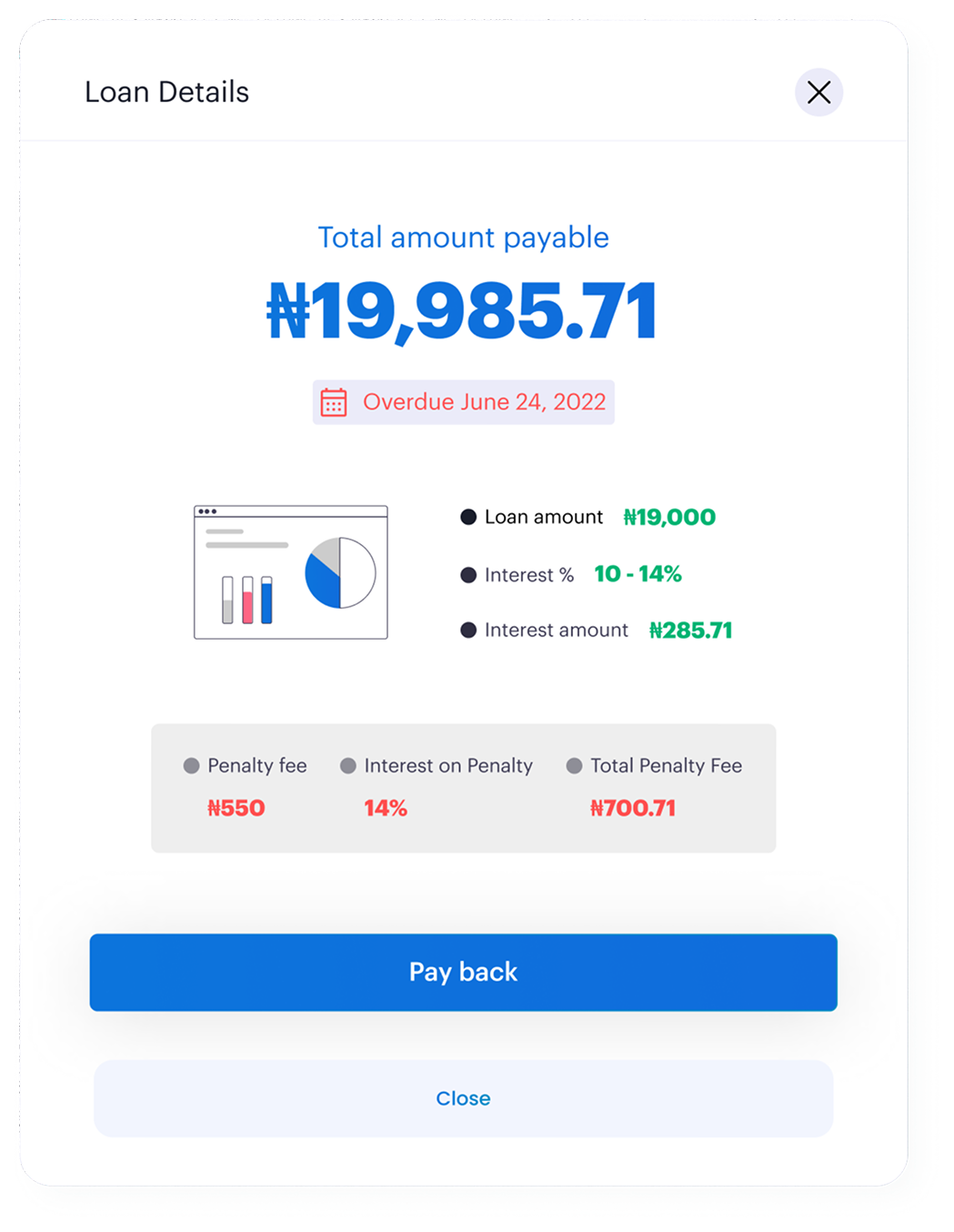
The loan details modal was designed for two states: active and overdue. Both show the same core information — total payable, loan amount, interest rate and amount — but the overdue state adds a red date label and a penalty breakdown section. Penalty fee, interest on penalty, and total penalty fee are all surfaced clearly. No hidden charges. No surprises.

Active loan details
Active Loan
Overdue loan with penalties
Overdue — With Penalty
Design decision: The overdue state retains the same "Pay back" CTA — removing friction to repayment even in a negative state. The penalty breakdown is informational, not accusatory — the language is factual, not punitive.

Repayment designed to feel frictionless

The pay back flow handles a high-stakes moment — users repaying real money. The flow lets users enter a custom amount (defaulting to the full loan), choose between card or bank account, and optionally schedule a future payment. The "Schedule payment for later" toggle reveals a date picker inline, reminding users of their due date, without requiring a separate screen.

Pay back — choose method
01 · Choose Method
Bank account selected
02 · Bank Selected
Schedule payment date picker
03 · Schedule Later
Repayment successful
04 · Success

Building a consistent visual language for lending

ElementDecisionRationale
Blue gradient sidebarBrand blue (#1251c5 → #0f3a9e) on the left navEstablishes authority and trust — consistent with how Nigerian financial institutions present
Modal-first flowsAll critical actions (BVN, loans, repayment) open in modals over the dashboardPreserves context — users always know where they are and can abandon without losing their place
Blue primary CTASingle blue button per modal, never competing with a second CTAReduces decision fatigue at the moment of commitment
Status coloursGreen = approved/success, Red = overdue/error, Amber = warningUniversally legible; no ambiguity in high-stakes financial states
OTP input boxesIndividual square boxes per digit with visible timer countdownReduces entry errors; the timer manages expectation without creating panic

From zero to a fully functioning lending platform

Product type
New 0→1
Booster had no prior design, no design system, and no existing flows to build from. Every screen was designed from first principles.
Loan providers surfaced
0
Users can compare and apply across 12 accredited lenders in a single session — no separate applications or multiple logins.
Core flows shipped
0
Auth, BVN verification, loan application, loan management, repayment, and error handling — all fully designed and documented.
Error states designed
0
Every critical failure — invalid OTP, failed BVN, request errors, overdue penalties — has a distinct, human-written state.

"Lending UX in Nigeria has historically been built around the lender's needs — not the borrower's. Booster was a chance to flip that. Every screen had to answer: does this make the user feel safer, or less?"

0→1 product design Trust-centred UX Error state design Fintech / Lending Web App

Next case study

Eversage Law — Legaltech platform

View case study